Bug #6570
open
Documents (View):- The delete document Confirmation pop-up heading and button color should change as per iOS
Added by Anantha kumar 7 months ago.
Updated 6 months ago.
Description
Steps:-
1.Login with LexiZ
2.Go to the Documents module
3.Select Client or Matter
4.Click on Documents view
5.Select any one of the document and delete it
6.During the delete an confirmation pop-up will appear
7.The pop-up heading and button color should match as per iOs
Please refer the Attachment.
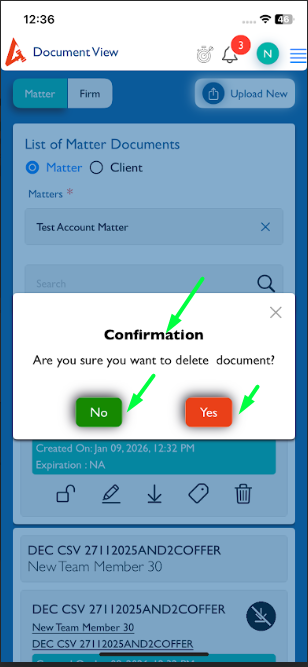
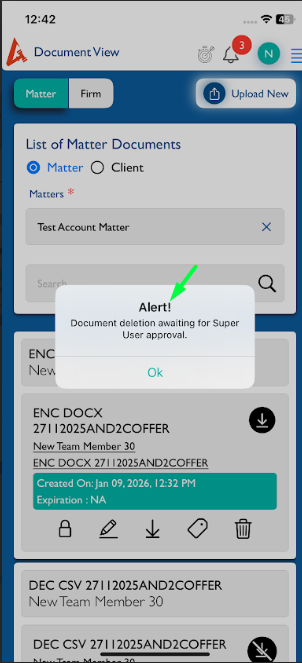
Note:- After deleting the document click on yes button. there is an alert pop-up will appear. the heading should change to Success.
Files
- Assignee changed from Arun Sundar to Anantha kumar
- Status changed from New to Fixed - Pushed to Staging
- Status changed from Fixed - Pushed to Staging to New
- Assignee changed from Anantha kumar to Arun Sundar
Not working, As per iOS design
- Status changed from New to Fixed - Pushed to Dev
- Assignee changed from Arun Sundar to Neela Chinnappa
- Status changed from Fixed - Pushed to Dev to Fixed - Pushed to Staging
- Status changed from Fixed - Pushed to Staging to New
Clicking yes form the confirmation, Pop up heading should say " Success"
But is says "Alert!"
This heading "Alert!" in success pop up should change to "Success" across all the modules
- Assignee changed from Neela Chinnappa to Arun Sundar
- Status changed from New to Feedback
- Assignee changed from Arun Sundar to Neela Chinnappa
I Confirmed with Raksha, for Deleting the document the popup needs to show the title as "Alert!".
Also available in: Atom
PDF