Actions
Bug #6382
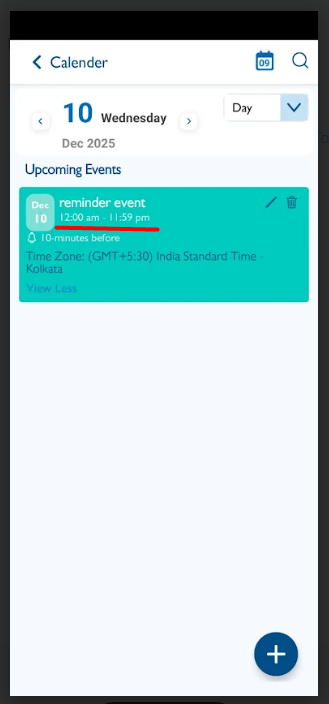
openCalendar – Reminder Event: When creating an event and selecting ‘All Day’, the time interval is displayed incorrectly. Instead of showing a time range, it should display ‘All Day
Start date:
12/09/2025
Due date:
% Done:
0%
Estimated time:
Description
It is not working for reminder events only
1. Login the Vitagist
2. Click on calendar module
3. Click on add button
4. Select reminder event
5. Enter the event title
6. Select All Day option
7. Click on save
8. Select the same event in view and check the time interval
Time range "12:00 am to 11:59 pm" appears wrongly
It should display "All day"
Files
Updated by Shobhika K 7 days ago
- Status changed from New to Fixed - Pushed to Dev
- Assignee changed from Shobhika K to Vengadeshwaran R
Actions