Actions
Bug #6293
closedCreate / Edit Event - Minutes and Hours notifications displayed for All Day events
Start date:
11/12/2025
Due date:
% Done:
0%
Estimated time:
Description
Description:
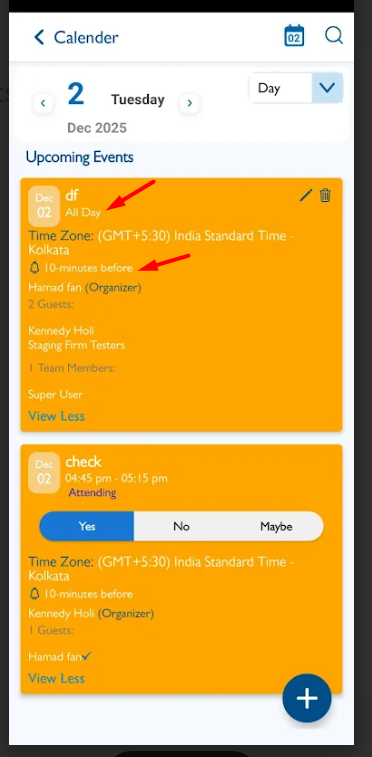
In the Create/Edit Event screen, when the event is marked as All Day, the notification dropdown still displays Minutes and Hours options. For All Day events, only Days or Weeks options should be shown in the notification dropdown.
1. Login the VitaGist
2. Click on Meetings
3. Create an all day
4. Observe the nofication dropdown
Minutes and Hours option are displayed, they should not be displayed. [Refer web]
Files
Updated by Shobhika K 9 months ago
- Status changed from New to Fixed - Pushed to Dev
- Assignee changed from Shobhika K to Neela Chinnappa
Updated by Shobhika K 8 months ago
- Status changed from Fixed - Pushed to Dev to Resolved
Updated by Neela Chinnappa 8 months ago
- File Screenrecorder-2025-12-02-16-46-31-59.mp4 Screenrecorder-2025-12-02-16-46-31-59.mp4 added
- Status changed from Resolved to New
- Assignee changed from Neela Chinnappa to Shobhika K
When creating an all-day event or converting a normal event into an all-day event, the Minutes Option still appears in the dropdown. This option should not be visible for all-day events.
Updated by Neela Chinnappa 8 months ago
Updated by Shobhika K 8 months ago
- Status changed from New to Fixed - Pushed to Dev
- Assignee changed from Shobhika K to Neela Chinnappa
Updated by Shobhika K 6 months ago
- Status changed from Fixed - Pushed to Dev to Fixed - Pushed to Staging
Updated by Shobhika K 6 months ago
- Status changed from Fixed - Pushed to Staging to New
Updated by Shobhika K 6 months ago
- Status changed from New to Fixed - Pushed to Staging
Actions