Bug #6813
closedRelationships (Add): When trying to send a request to an entity client, after finding the entity and clicking the Send Request button, a warning appears stating that the mobile number is invalid because it is masked.
0%
Description
Steps:-
1.Login with LexiZ
2.Go to the Relationship module
3.Click on Add relationship
4.Search and select the entity client
5.if the client has phone number with masked text
6.Click on send request button
7.There is an warning stating 'Please enter a valid 10 digit mobile number"
8.Please refer the Attachment.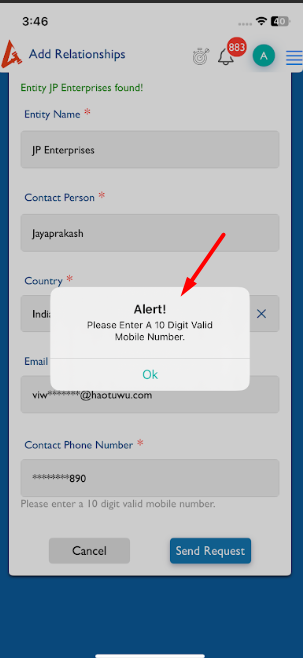
Files
Updated by kumar r 6 months ago
- Status changed from New to Feedback
- Assignee changed from kumar r to Anantha kumar
Not based on the mobile number masking, On that entity mobile number was not in 10 digit.
Number wrong, that's why getting error. But now can update like, On new entity create have the validation, on existing entity request we no need validation just trigger the send request.
{"error": false, "data": {"entityName": "JP Enterprises", "contactPerson": "Jayaprakash", "email": "viwes26747@haotuwu.com", "country": "India", "contactPhone": "91234567890"}}