Actions
Feature #6492
openDocument Upload screen - Multiple document attached - When edit button clicked , an empty space created for the document which is beside the document edit
Start date:
12/30/2025
Due date:
% Done:
0%
Estimated time:
Description
1. Login to LexiZ
2. Click on Document
3. Click on "upload button"
4. Click on Browse button
5. Select 2 or more documents
6. Click on pencil icon of any document
The document which is beside this document also gets expanded with empty space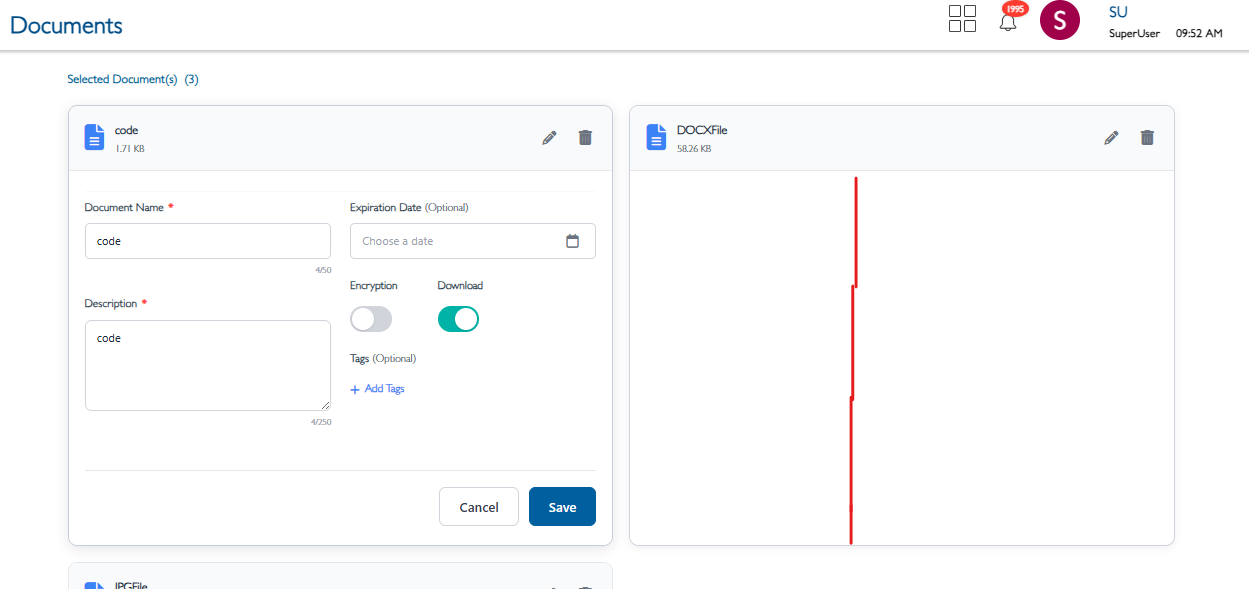
Files
Updated by Soundarya Vembaiyan 8 months ago
- Assignee changed from Soundarya Vembaiyan to Dhivyalakshmi Karthikeyan
Updated by Dhivyalakshmi Karthikeyan 8 months ago
- Status changed from New to Fixed - Pushed to Staging
Updated by Dhivyalakshmi Karthikeyan 8 months ago
- Assignee changed from Dhivyalakshmi Karthikeyan to akhila bs
Actions