Actions
Bug #6481
openDocument - Upload - Firm : The Download button/icon should be visible and enabled for the document but it doesnot appear.
Start date:
12/30/2025
Due date:
% Done:
0%
Estimated time:
Description
Steps to Reproduce:
- Log in to Lexiz.
- Click on the Menu and select the Document module.
- Click Upload New and select the Firm tab.
- Click Browse, select any document, and then click Edit.
- Enable the Download option and click Upload.
- Navigate to the View Document screen.
Expected Result:
The Download button/icon should be visible and enabled for the document.
Actual Result:
The Download button/icon does not appear in the View Document screen.
Note:
Applicable to all user accounts.
Files
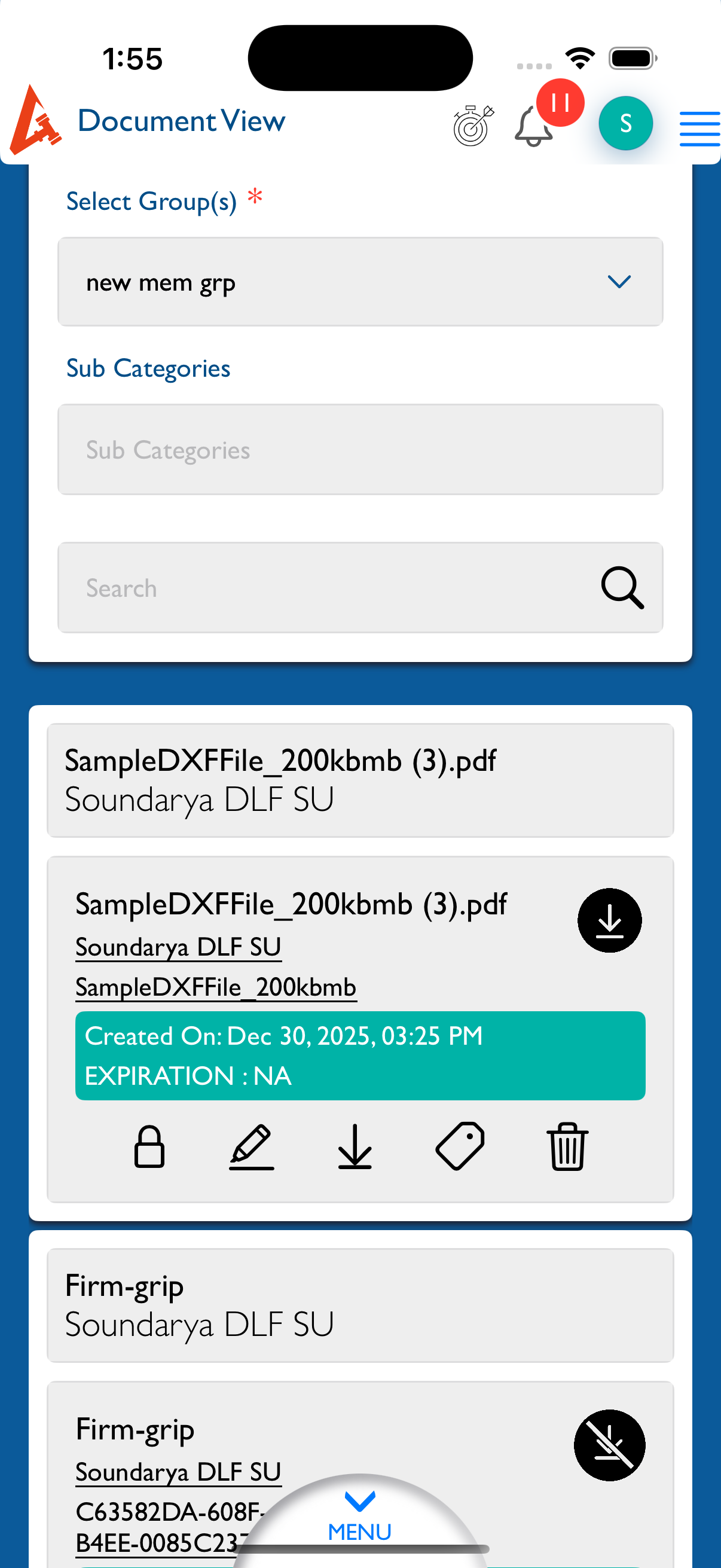
Updated by kumar r 4 days ago
- File Simulator Screenshot - iPhone 16 Pro - 2025-12-30 at 13.55.21.png Simulator Screenshot - iPhone 16 Pro - 2025-12-30 at 13.55.21.png added
- Status changed from New to Fixed - Pushed to Staging
- Assignee changed from kumar r to Vengadeshwaran R
Updated.
Actions