Actions
Bug #6411
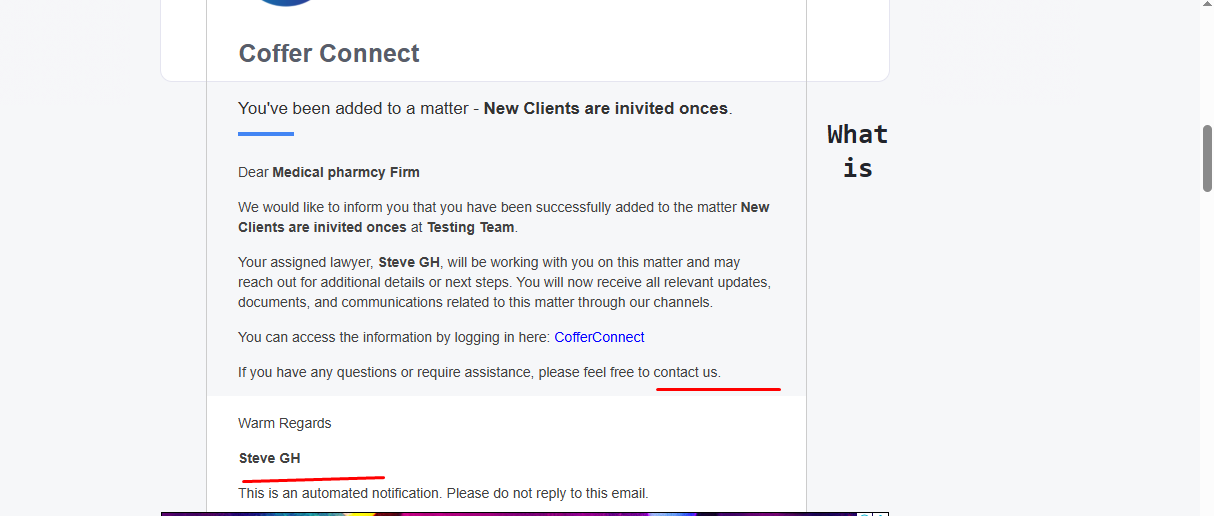
openMatter Email : Missing text in matter notification email
Start date:
12/22/2025
Due date:
% Done:
0%
Estimated time:
Description
Steps to Reproduce:
- Log in to Lexiz.
- Click Matter from the left menu.
- Select Legal or General Matter.
- Create a new matter and fill in all required details, including client information.
- Submit the matter.
- The respective client is receives a matter notification email.
Actual Result:
Some text/content is missing in the received email.
Expected Result:
The email should display all required text and matter details correctly.
Missing text is "We look forward to supporting you."
and Firm name "[Firm Name – optional]"
Files
No data to display
Actions