Actions
Bug #6384
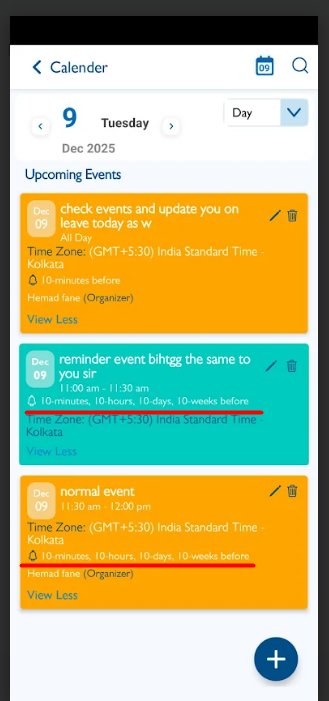
closedView Calendar – When notifications are added in all formats (minutes, hours, days, weeks), they should be displayed correctly as per iOS standards
Start date:
12/09/2025
Due date:
% Done:
0%
Estimated time:
Description
1. Login the Vitagist
2. Click on calendar module
3. Click on add button
4. Select reminder/Event event
5. Enter the event title
6. Add the notification in all formats (minutes, hours, days, weeks)
7. Click on save
8. Observe the all formats of notifications in view
They should be displayed as per iOS
Files
Updated by Shobhika K 9 months ago
- Status changed from New to Fixed - Pushed to Dev
- Assignee changed from Shobhika K to Neela Chinnappa
Updated by Shobhika K 7 months ago
- Status changed from Fixed - Pushed to Dev to Fixed - Pushed to Staging
- Assignee changed from Neela Chinnappa to Anantha kumar
Updated by Neela Chinnappa 7 months ago
- Status changed from Fixed - Pushed to Staging to Closed
Actions