Actions
Bug #6361
openSettings - Reset Password - UI Issues
Start date:
12/04/2025
Due date:
% Done:
0%
Estimated time:
Description
1. Login the VitaGist
2. Click on settings
3. Click on profile information
4. Click on Edit profile
5. Click on edit button in password
6. In the Reset password,
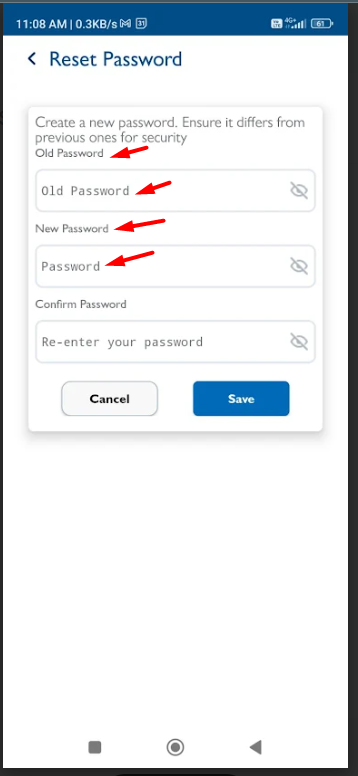
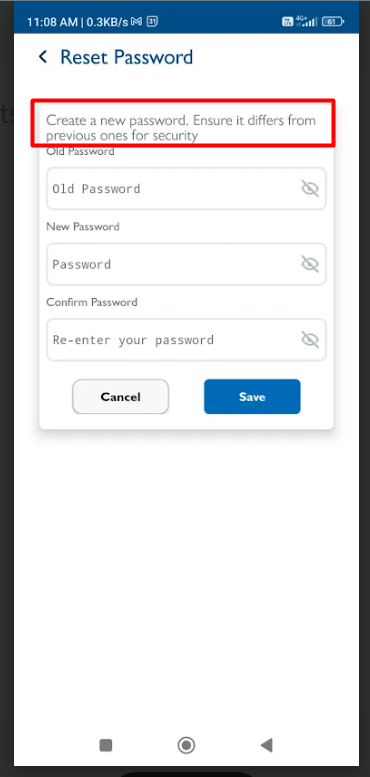
- space is required between the text “Create a new password…” and “Old Password.”
- The hint text in all fields appears larger than the field labels; the hint text size should match iOS standards.
- “Create a new password…” should be displayed in bold as per iOS design.
- The font style for field names and hint text should be consistent across all fields.
Files



Updated by Shobhika K 13 days ago
- Status changed from New to Fixed - Pushed to Dev
- Assignee changed from Shobhika K to Neela Chinnappa
Actions