Actions
Bug #6328
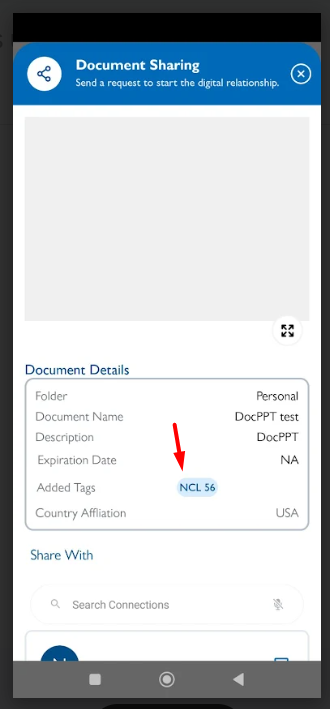
openView Documents - Tag Alignment Issue on Document View
Start date:
11/19/2025
Due date:
% Done:
0%
Estimated time:
Description
1. Login the VitaGist
2. Click on Documents module
3. Select any folder
4. Select any documents [Make sure document has the tags]
5. Click on the share under action
6. Observe the tag which added
It is not aligned properly.
It should be properly displayed [Refer iOS]
Files
Updated by Shobhika K 10 months ago
- Status changed from New to Fixed - Pushed to Dev
- Assignee changed from Shobhika K to Neela Chinnappa
Updated by Shobhika K 7 months ago
- Status changed from Fixed - Pushed to Dev to Fixed - Pushed to Staging
- Assignee changed from Neela Chinnappa to akhila bs
Actions