Actions
Bug #5198
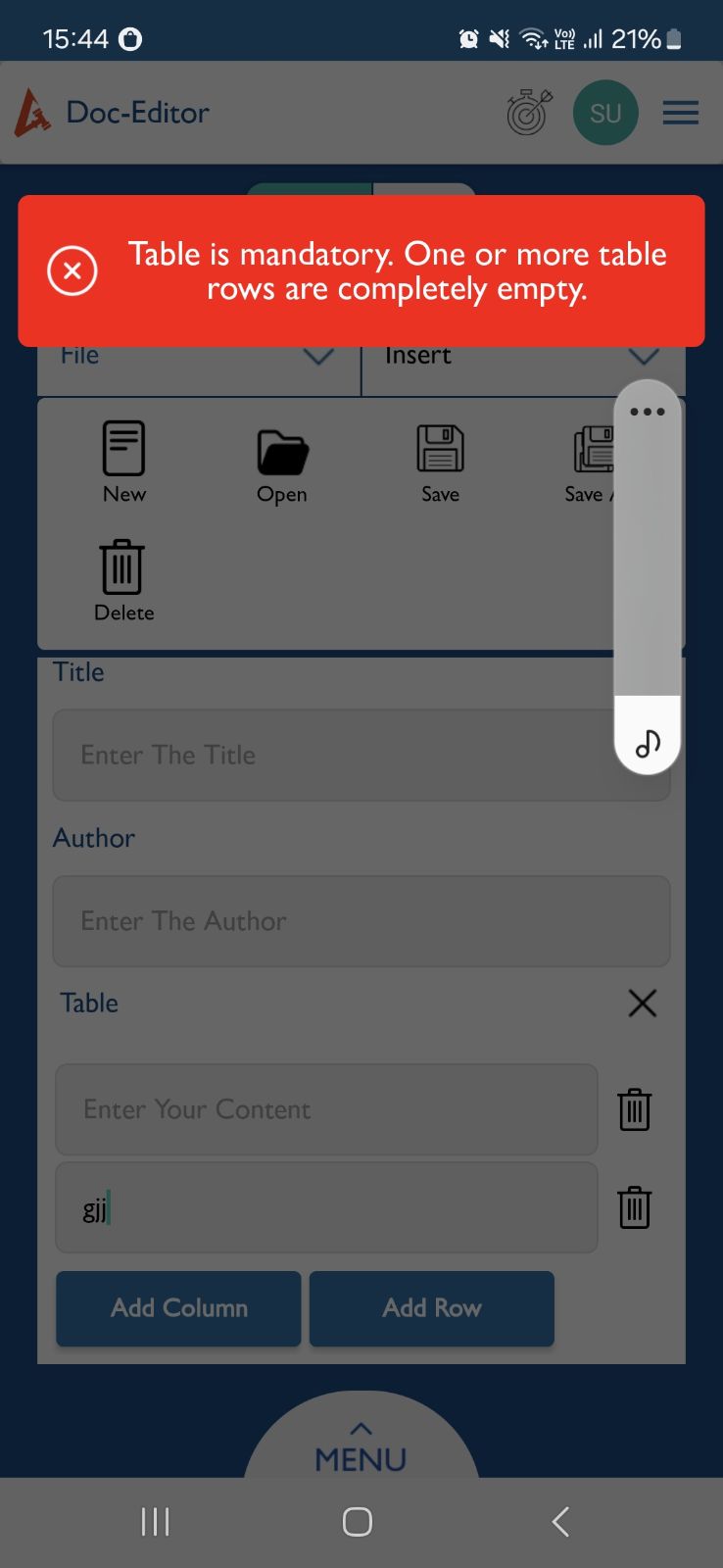
closedCreate / Edit : Table error message should not appear if at least one input field is filled.
Start date:
07/25/2025
Due date:
% Done:
0%
Estimated time:
Description
Steps to Reproduce:
- Login to Lauditor.
- Click on the Menu and select Doc Editor.
- Navigate to the Create tab.
- Click on the Insert menu and select Table.
- Add multiple rows using the Add Row button.
- Enter text in one of the table cells (e.g., in the third row).
- Click on File > Save.
Expected Result:
If at least one cell in the table has input, the document should save successfully without showing an error message.
Actual Result:
An error message appears even though one or more cells contain text.
Files
Updated by Arun Sundar 7 months ago
- Status changed from New to Resolved
- Assignee changed from Arun Sundar to Anonymous
Updated by Anantha kumar 7 months ago
- Status changed from Resolved to New
- Assignee changed from Anonymous to Arun Sundar
Unable to check the issue, because the table empty cell validations are happening.
Updated by Arun Sundar 7 months ago
- Status changed from New to Resolved
- Assignee changed from Arun Sundar to Anantha kumar
Updated by akhila bs 6 months ago
It works only when any cell value is added in a every row . If only rows are added (Meaning single column) or two rows and two columns added and any one cell is filled --> We get an alert. document will not be saved
Expected :If at least one cell in the table has input, the document should save successfully without showing an error message
Updated by Arun Sundar 6 months ago
- Status changed from New to Resolved
- Assignee changed from Arun Sundar to Anantha kumar
Actions