Bug #3682
open
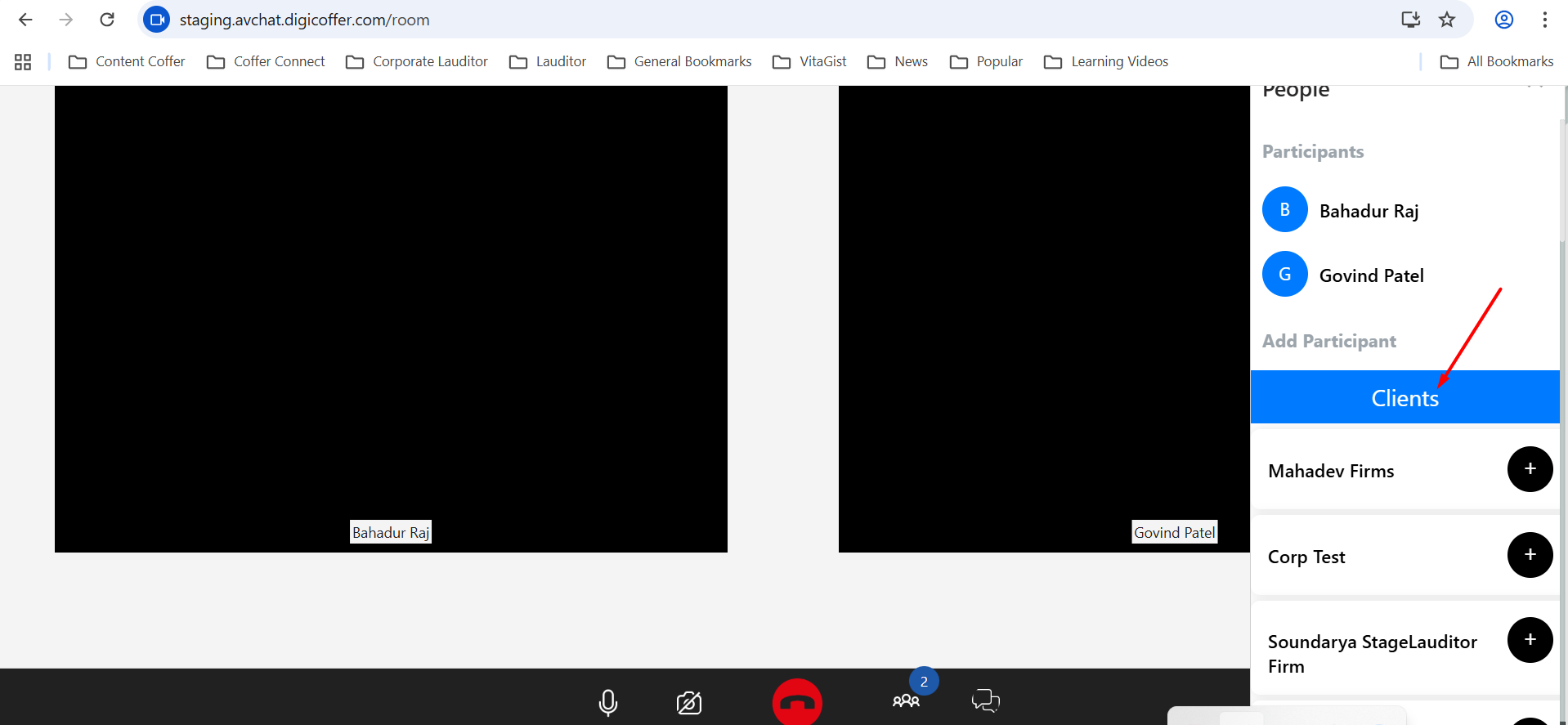
DG Counsel - Message - Video Chat [Staging] : Update the text on the left side from "Clients" to "External Counsels."
Added by Anonymous over 1 year ago.
Updated 8 months ago.
Description
Steps:
1. Log in to DG Counsel.
2. Click on the Message module in the left-side panel.
3. Select Video Chat on the right side.
4. Change the text on the left side from "Clients" to "External Counsels."
Note: After joining the call, in Add Participant, update the text from "Clients" to "External Counsels."
Files
- Project changed from AV Chat to Chat - Web
- Subject changed from DG Counsel - Message - Video Chat : Update the text on the left side from "Clients" to "External Counsels." to DG Counsel - Message - Video Chat [Staging] : Update the text on the left side from "Clients" to "External Counsels."
- Assignee changed from Anonymous to Chandan Bharadwaj
- Status changed from New to Fixed - Pushed to Dev
- Status changed from Fixed - Pushed to Dev to Fixed - Pushed to Staging
Note: After joining the call, in Add Participant, update the text from "Clients" to "External Counsels." - This is not fixed
Also available in: Atom
PDF