Actions
Bug #6565
openDocuments (Upload): While uploading documents to a Matter/Client/Firm, try to edit the metadata and add tags. The tag field limit count shows an invalid number.
Start date:
01/09/2026
Due date:
% Done:
0%
Estimated time:
Description
Steps:-
1.Login with LexiZ
2.Go to the Documents Module
3.Select Client/Matter/Firm
4.Click on upload documents
5.Select the document and edit the meta data
6.Click on Add Tag button
7.Enter the Tag type and Tag
8.While entering text into the tag field.
9.Below the Character limitation shows the invalid count
Please refer the Attachment.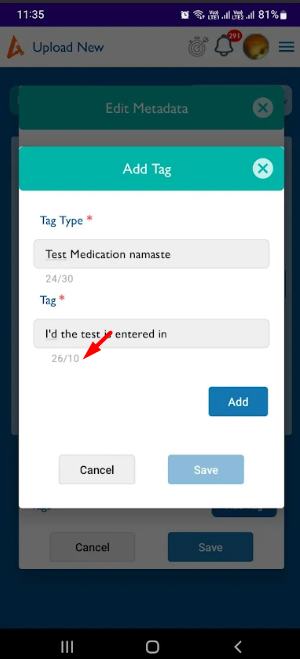
Files
No data to display
Actions