Actions
Bug #6556
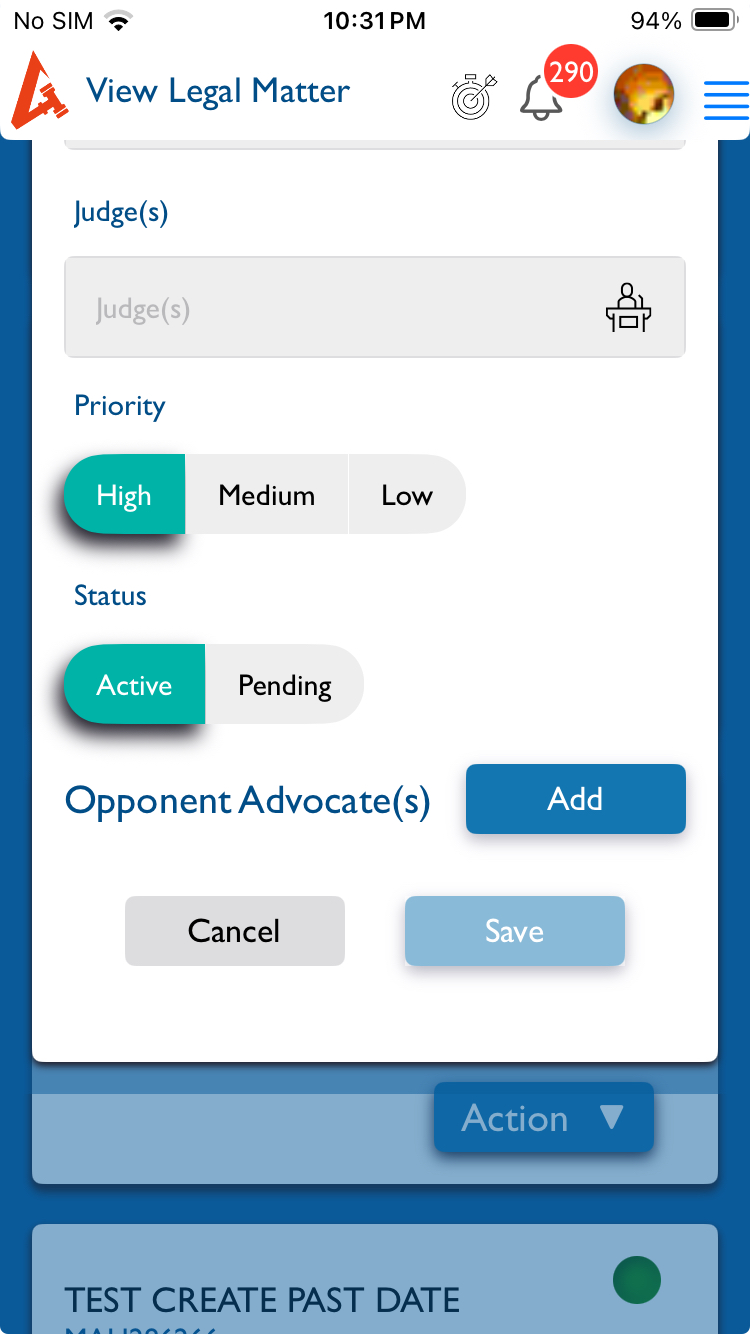
openMatter (View):- The opponent lawyers heading is missing when edit the Matter information. the heading should be displayed
Start date:
01/07/2026
Due date:
% Done:
0%
Estimated time:
Description
Steps:-
1.Login with LexiZ
2.Go to the Matter Module
3.Click on Legal matter
4.Select any one of the Legal Matter
5.Go to action and click Edit Matter info
6.The edit page will open
7.Move to bottom there is opponent lawyers label is missing.
8.There is only add button is visible
Please refer the Attachment
Note: It only happened in Phone not in iPad
Files
Updated by kumar r 11 days ago
- File Screenshot 2026-01-07 at 10.31.51 PM.jpeg Screenshot 2026-01-07 at 10.31.51 PM.jpeg added
- Status changed from New to Fixed - Pushed to Staging
- Assignee changed from kumar r to Anantha kumar
Updated.
Actions